Before you can dive into a delicious bowl of Dandan Mian in Chengdu or explore the Bund in Shanghai, you need to arm yourself digitally. In China, Alipay is the ultimate “Super App” that serves as your digital wallet, map, and translation assistant all in one.
1.Why Alipay is the #1 Choice for International Tourists
While there are other options, Alipay is the most recommended platform for first-time visitors.
Direct Card Linking: Alipay has a long-standing partnership with international networks like Visa, Mastercard, JCB, and Diners Club.
Higher Success Rate: The registration and verification process for foreign passport holders is generally more stable and faster than other local platforms.
English Interface: The app features a robust “International Version” specifically designed for tourists.
2.Step-by-Step: Setting Up Your Alipay Account
2.1 Step 1: Download and Register
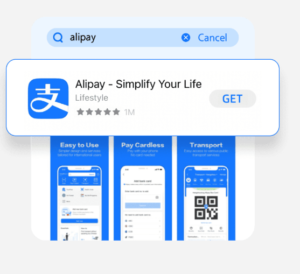
- Search for Alipay in the iOS App Store or Google Play Store.
- Install the app and open it.
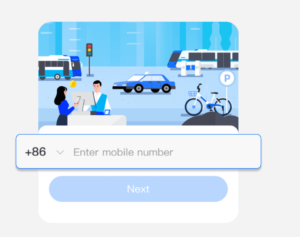
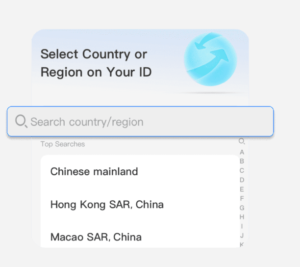
- Register using your international mobile phone number.
Note: Ensure you select the correct International Access Code (e.g., +1 for USA, +44 for UK, +49 for Germany, +61 for Australia).
2.2 Passport Verification & Linking Your International Card
This is the most critical step to ensure your payments go through smoothly.
- Navigate to “Balance” or “Bank Cards“: In the app, go to the “Account” or “Wallet” section.
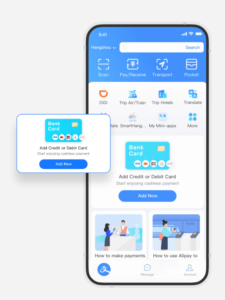
- Add Your Card: Tap “Add Bank Card.”
- Use a Supported Card: Enter your card details. Alipay supports Visa, Mastercard, JCB, Discover, and Diners Club.

- Real-Name Verification (Identity Tech): You will be prompted to verify your identity. This is mandatory under Chinese financial regulations. You will need to:

- Upload a clear photo of your Passport.
- Complete a quick Facial Recognition (Selfie) scan.
- The review process is now much faster, often taking just minutes to a few hours.
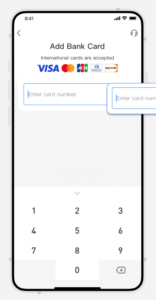
Please note: The name on the linked bank card must match the name verified on your Alipay account.
2.3Step 3: Automatic Currency Conversion
One of the best features of modern Alipay is that it handles the math for you.
- Bypass “TourPass“: You no longer need separate prepaid cards. Your linked international card works directly.
- Auto-Conversion: When you pay, the system converts RMB to your home currency automatically at the current exchange rate.
- Transaction Fees: Transactions under 200 RMB are currently exempt from service fees. For transactions over 200 RMB, a small 3% fee usually applies.
3.Field Guide: How to Pay at Street Stalls and Shops
Once your card is linked, you can pay at 99% of locations in China. There are two primary ways to do it:
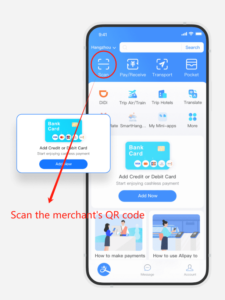
3.1 Method A: “Scan” — You Scan the Merchant’s QR Code
This is the most common method at small street vendors and family-run stalls.
-
Locate the Code: Walk up to the stall and spot the QR Code (it might be red, blue, or simply black and white).
-
Tap “Scan”: : Open Alipay and tap the “Scan” (扫一扫) icon at the top left.
-
Enter Amount: Type in the amount in RMB (e.g., 8.00 for a bowl of Bingfen).
-
Confirm:Tap “Pay” and show the confirmation screen to the vendor.
3.2 Method B: “Pay/Receive” — The Merchant Scans You
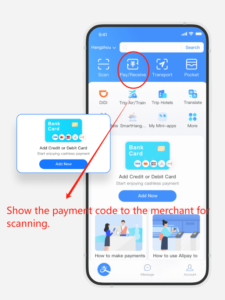 This method is common at slightly larger street food chains or in stores with dedicated scanners. It’s often the fastest way to pay once you know the process.
-
Signal Your Intent: Simply tell the vendor you are ready to pay. A simple, friendly gesture will do!
-
Generate Your Code: Open your payment app and tap the large “Pay” or “Payment Code” icon on the home screen. This generates a unique QR code and barcode on your phone.
-
The Scanner Does the Work: The vendor will use their handheld scanner or a fixed terminal to scan the code displayed on your screen.
Done! The transaction is automatic, and the correct amount is deducted instantly.Security Note: Your displayed Payment Code is dynamic—it changes every few minutes. This rapid rotation is what makes it extremely secure, preventing unauthorized use if your code is accidentally photographed.
4. Pro Tips & Troubleshooting for Seamless Eating
You’re set! But before you hit the streets, here are a few final pro tips to ensure your mobile payment experience is always smooth:
4.1 Data is Non-Negotiable
The Reality: Mobile payment is entirely dependent on connectivity. Unlike a foreign credit card, these transactions require an internet connection.Pro Tip: Before you even leave the airport, ensure you have secured a local data SIM card or rented a reliable portable Wi-Fi device. A dead zone equals a failed payment—and an empty stomach!
4.2 Don’t Worry About Small Limits (Mostly)
If you successfully linked your international bank card, you might have heard about transaction limits.The Good News: While your card might have a daily or single-transaction spending limit imposed by the app (e.g., ¥50,000 RMB), these limits are usually set so high they won’t affect street food purchases. Worrying about limits on an ¥8 bowl of Bingfen is unnecessary! Just be aware they exist for very large purchases.
4.3 The Essential Chinese Food Phrases
Communication is easy when paying, but knowing these two phrases can expedite the process and earn you a friendly smile:
| Phrase | Pinyin | Meaning | When to Use It |
| 扫码 | Sao ma | Scan Code | When asking the vendor where to scan their QR code. |
| 付钱 | Fu qian | Pay Money | When you are ready to pay and need the vendor’s attention |
5. Conclusion: Go Eat!
Congratulations! You have successfully navigated the digital landscape of Chinese payment. That initial anxiety over cash and cards is gone, replaced by the exciting freedom of a local.
You are now fully equipped to conquer the glorious street food scene of Chengdu. No more frantic searches for ATMs, and no more awkward moments holding up the line. Your phone is your new wallet, and the entire city’s menu is open to you.
➡️ What’s Next on Your Chengdu Adventure?
Now that you’ve mastered the payment secret, it’s time to choose where to eat next! Click here to check out our ultimate “Chengdu Travel Guide: Your Ultimate Itinerary Planner !”
🎉 Loved This Article? Don't Miss the Next One!
Subscribe to our newsletter and get exclusive content and the latest updates delivered straight to your inbox.